Ads 468x60px

Pages

Showing posts with label Recovery Tools. Show all posts

File Recover Free

File Recover allows you to recover critically important documents, or other files, which have been lost by accidental deletion. 
These files may be lost by emptying the Recycle Bin, or using other deletion actions that bypass the Recycle Bin altogether. 
Such actions include Windows Shift-Delete, command line deletion, deleting excessively large files or using applications that delete files without the Recycle Bin.

WinRar Password Recovery Free Download

RAR Password Recovery is a live-saving application that can turn a bad day around and help you find the secret word you use to protect your RAR archives.

WinRar Password Recovery Free Download

RAR Password Recovery is a live-saving application that can turn a bad day around and help you find the secret word you use to protect your RAR archives.

Sticky Password Manager free

Sticky Password Manager is an intelligent form filler and password management program. It remembers and automatically fills in login, password and other fields. It works with any program or web browser on your computer including Internet Explorer and Mozilla Firefox.
Unlike other password managers, that just used to keep and recall passwords, Sticky Password integrates password management features to any program on your computer.
ou can access and manage your passwords immediately! Forget about "prehistoric" searching through the list of passwords.

MICRO SD Memory Card Password Remover

MICRO SD Memory Card Password Recovery / removing 4 method.


For Symbian Mobiles:
1. Download and Install  FExplore
2. Insert your card into your phone, without accessing it through the phone
3. Run FExplorer and Open the path C:\system
4. Find the file called mmcstore, and rename it mmcstore.txt
5. Copy that file (mmcstore.txt) to your PC and open it in Notepad
6. Your password will be located within that file.
---------------

Windows 7/8 - OEM Recovery Partition Creator v1.3.12B

Windows 7/8 - OEM Recovery Partition Creator v1.3.12B
Windows 7/8 - OEM Recovery Partition Creator v1.3.12B | 83.7 MB

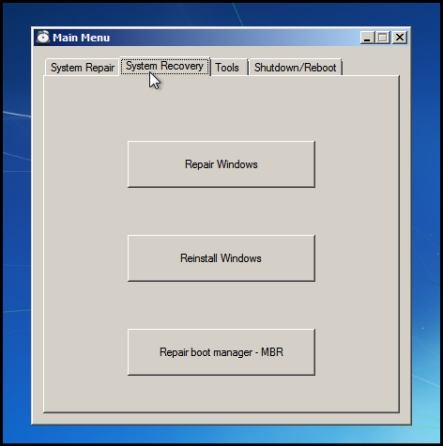
Purpose of this software : Create a recovery partition to allow easy and fast recovery to a working state of Windows 7/8
This is similar to the OEM recovery option used on brand name computers like DELL, HP or Compaq.
This IS NOT a backup software. It should NOT be used to backup a full install of Windows 7/8 with your personnal files.

WinRar Password Recovery Free Download

RAR Password Recovery is a live-saving application that can turn a bad day around and help you find the secret word you use to protect your RAR archives.


Just like its name suggests, RAR Password Recovery is a tool supposed to recover lost passwords using a very long and advanced process.
Since it does such a complicated task, it’s almost mandatory to provide an easy way to interact with the user.
And the interface RAR Password Recovery comes with is pretty simple, but you might have to read the help file a little bit to get to know every type of password recover offered by the app.

WinRar Password Recovery / remover Free Download

RAR Password Recovery is a live-saving application that can turn a bad day around and help you find the secret word you use to protect your RAR archives.


Just like its name suggests, RAR Password Recovery is a tool supposed to recover lost passwords using a very long and advanced process.
Since it does such a complicated task, it’s almost mandatory to provide an easy way to interact with the user.
And the interface RAR Password Recovery comes with is pretty simple, but you might have to read the help file a little bit to get to know every type of password recover offered by the app.

Windows 7/8 - OEM Recovery Partition Creator v1.3.12B

Windows 7/8 - OEM Recovery Partition Creator v1.3.12B
Windows 7/8 - OEM Recovery Partition Creator v1.3.12B | 83.7 MB

Purpose of this software : Create a recovery partition to allow easy and fast recovery to a working state of Windows 7/8
This is similar to the OEM recovery option used on brand name computers like DELL, HP or Compaq.
This IS NOT a backup software. It should NOT be used to backup a full install of Windows 7/8 with your personnal files.

Purpose of this software
Create a recovery partition to allow easy and fast recovery to a working state of Windows 7/8
This is similar to the OEM recovery option used on brand name computers like DELL, HP or Compaq.
This IS NOT a backup software. It should NOT be used to backup a full install of Windows 7/8 with your personnal files.

Target audience
OEM system manufacturer
Power user
Home technician that is bothered to always reinstall windows of friend's/familly computer

Features
Create a complete image of the Windows installation
Official Microsoft method for system recovery with some modifications
Make use of built-in Windows 7/8 software but with added options in a custom menu
Bit-Locker is supported (but not TrueCrypt)
Support for UEFI/GPT
USB recovery media creator in Windows 7/8
Support the creator of a custom "Refresh" image under Windows 8

Future development
Create a recovery guide for the END USER


Better installation instruction part in the installation manual
Auto-Reboot after recovery process under Windows 7 DONE
Add splash image (off by defaut) for system manufactuer DONE
Support line-splitting for text in the custom GUI DONE
Find a way to be 100% sure that the recovery letter is hidden in Windows (SetupComplete.Cmd?) DONE